Skip to content

SingleApi

Internet, programming, artificial intelligence

Menu
  • Home
  • About
  • My Account
  • Registration
Menu

Repo Prompt and Ollama

Posted on December 17, 2024

For a question about using Ollama in the same manner as o1 works (i.e., returning the Whole or Diff format ready for merging), the repository owner provided the following response:

Ollama models don’t really work with diff unfortunately. Whole you want something with at least 14b params

However, for instance, deepseek-coder-v2:16b-lite-instruct-q4_0 still doesn’t work for me. So, I attempted to resolve it in the manner Claude Sonnet 3.5 is used in the Apply tab of Repo Prompt. I created a system prompt attached to Instructions in Compose:
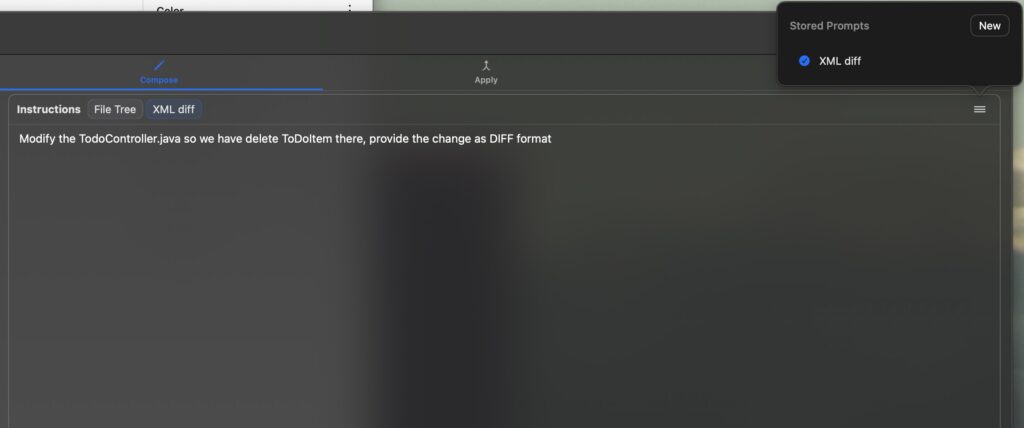
Prompt itself looks like (it’s not covering the everything, it only works for me with llama3.1, codellama ignores it):

Response format as XML diff:

<Plan>
<!-- What is planned to be done -->
</Plan>

<file path="filename" action="modify">
<change>
<description><!-- Modification description --></description>
<search>
```
code to be replaced
```
</search>
<content>
```
replacement
```
</content>
</change>
</file>

Rules:
- you can have as many `change` tags under `file` as changes
- you can have as many `file` as siblings
- in code blocks do not replace `<` and `>` with entities, use just < and > where required
- do not add anything else between tags
- if you need to create new file create new filename and change `action="modify"` to `action="create"`

Example:

<Plan>
I'll add a rename endpoint in Controller and ...
</Plan>

<file path="backend/src/main/java/com/example/Controller.java" action="modify">
<change>
<description>Rename endpoint in Controller</description>
<search>
```
@PutMapping("/reorder")
```
</search>
<content>
```
@PostMapping("/reorderng-new")
```
</content>
</change>
</file>

<Plan>
I'll add field in Item ...
</Plan>

<file path="backend/src/main/java/com/example/Item.java" action="modify">
<change>
<description>Add field firstName in Item</description>
<search>
```
private Map map;
```
</search>
<content>
```
private Map map;
private String firstName;
```
</content>
</change>
</file>

Another idea is to use the Ollama formatting introduced recently, instead of including this in the prompt. However, this method may not be sufficient if the context is not sufficiently large. The result of using the above method would be:
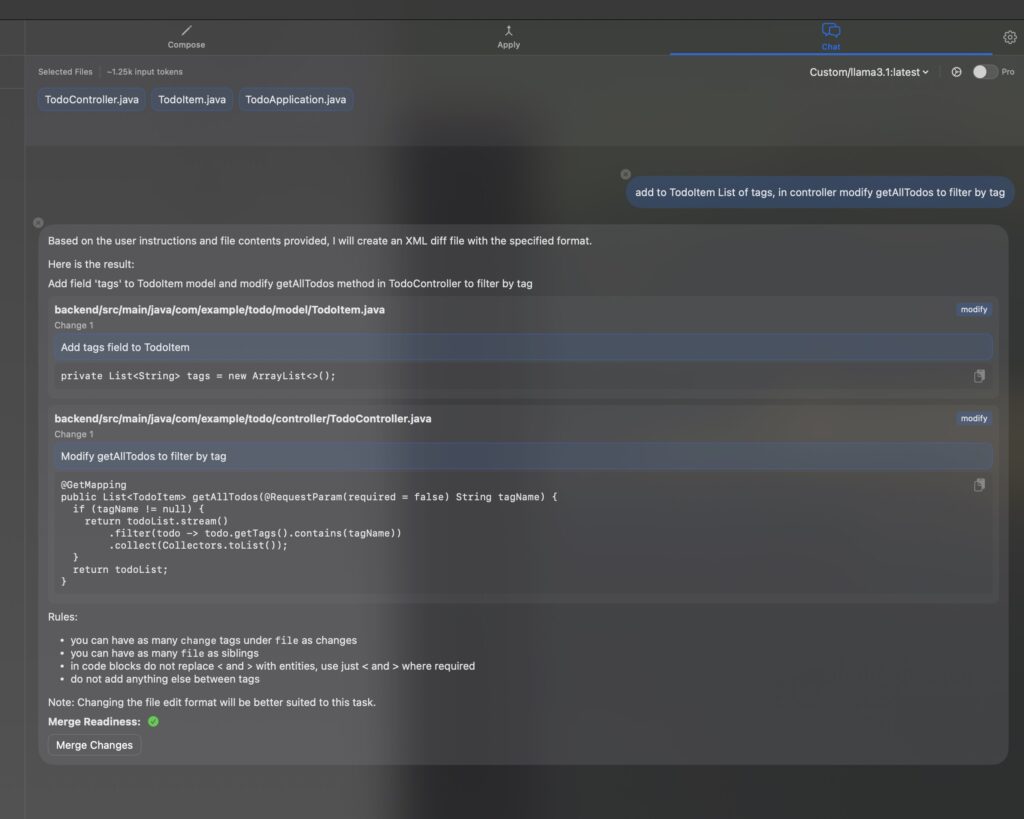
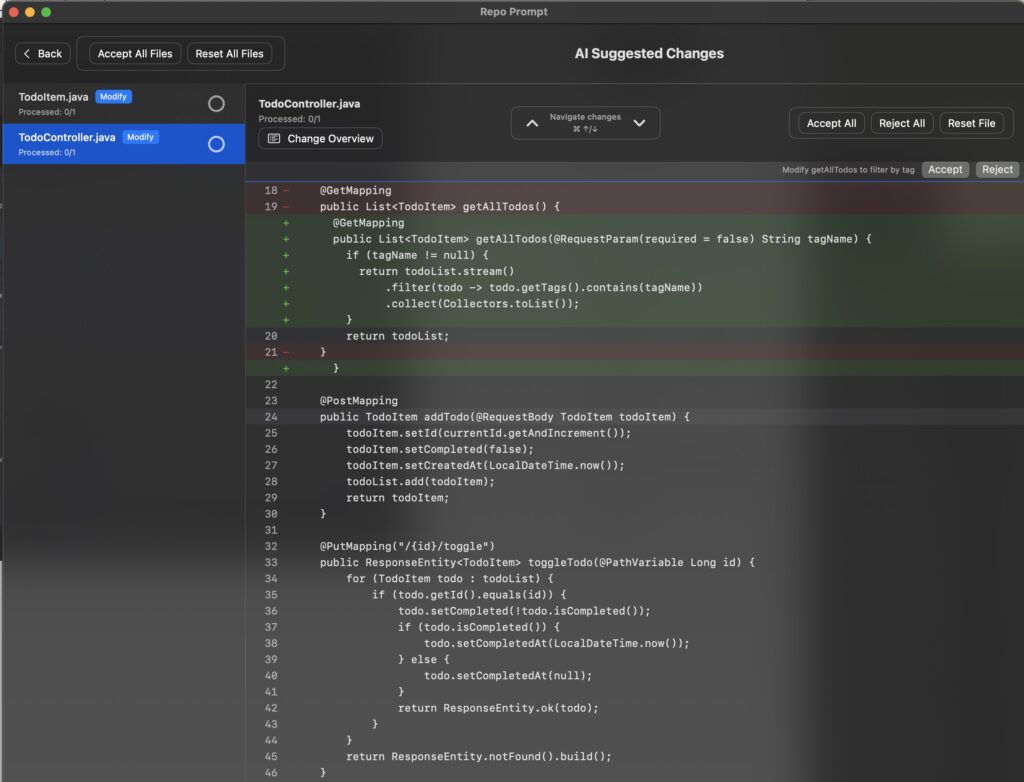
llama3.1 response in required format
Merge screen contains all the changes we want to be applied.

I’m not particularly keen on prompt formatting because I already encountered an issue with it in my project (the model didn’t adhere strictly to the rules). Therefore, I’ll explore some provider solutions. However, for now, experimenting with the Prompt Repo and using a temporary solution will suffice as a workaround.

Recent Posts

  • Kimi 2.5 and OpenAI Codex Drive AI Advancements
  • Moltbot AI Assistant and Kimi K2.5 Multimodal Model Advances
  • Claude Code 2.1.20 and Verdent Agentic AI Advances
  • Claude Code with Anthropic Opus 4.5 and Ralph Wiggum Technique Drive AI-Powered Autonomous Software Development and Multi-Agent Orchestration
  • Claude Code my full remote flow

Recent Comments

  • adrian on Anthropic Launches Claude Cowork Powered by Claude Code for AI-Driven Workplace Task Automation and Agentic AI Development
  • adrian on Advancements in AI Foundation Models Agentic Frameworks and Robotics Integration Driving Next Generation AI Ecosystems
  • adrian on n8n DrawThings
  • adrian on Kokoro TTS Model, LLM Apps Curated List
  • adrian on Repo Prompt and Ollama

Archives

Categories

agents ai apps automation blender cheatsheet claude codegen comfyui deepseek devsandbox docker draw things flux gemini gemini cli google hidream hobby huggingface hugging face java langchain4j llama llm mcp meta mlx movies n8n news ollama openai personal thoughts quarkus rag release repo prompt speech-to-speech spring stable diffusion tts vibe coding whisper work

Meta

  • Register
  • Log in
  • Entries feed
  • Comments feed
  • WordPress.org

Terms & Policies

  • Comments Policy
  • Privacy Policy

Other websites: jreactor gaming.singleapi

©2026 SingleApi | Design: Newspaperly WordPress Theme
We use cookies on our website to give you the most relevant experience by remembering your preferences and repeat visits. By clicking “Accept”, you consent to the use of ALL the cookies.
Do not sell my personal information.
Cookie settingsACCEPT
Privacy & Cookies Policy

Privacy Overview

This website uses cookies to improve your experience while you navigate through the website. Out of these cookies, the cookies that are categorized as necessary are stored on your browser as they are essential for the working of basic functionalities of the website. We also use third-party cookies that help us analyze and understand how you use this website. These cookies will be stored in your browser only with your consent. You also have the option to opt-out of these cookies. But opting out of some of these cookies may have an effect on your browsing experience.
Necessary
Always Enabled
Necessary cookies are absolutely essential for the website to function properly. This category only includes cookies that ensures basic functionalities and security features of the website. These cookies do not store any personal information.
Non-necessary
Any cookies that may not be particularly necessary for the website to function and is used specifically to collect user personal data via analytics, ads, other embedded contents are termed as non-necessary cookies. It is mandatory to procure user consent prior to running these cookies on your website.
SAVE & ACCEPT